
Set up a DVR, ou stand-alone, to be accessed remotely is no big deal, but for those who have no experience below follows a step by step tutorial on how to set up your stand-alone to view your cameras from anywhere that has internet access.
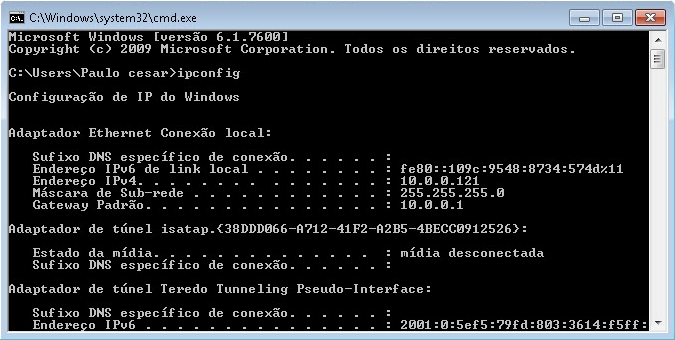
1º Step: Check the information of your network
click in Start > run > type it CMD e de enter.
No Command prompt which opened type ipconfig e de enter.
Record the following information for later use:
- Subnet Mask
- default Gateway
2º Step: Configurar o stand-alone (internal and external access)
As there are several models the way to configure each DVR may vary, but the premise is the same.
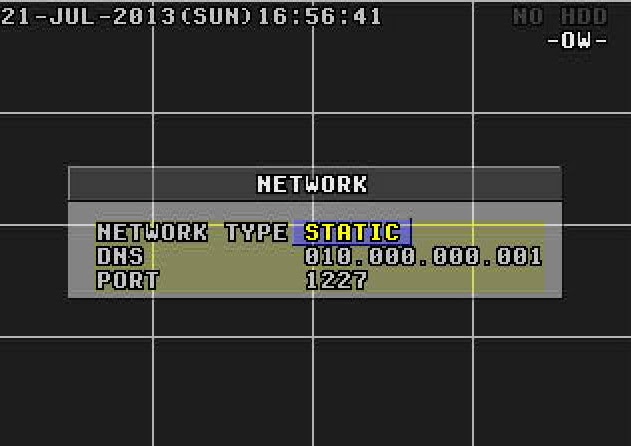
Menu > Advance > Network
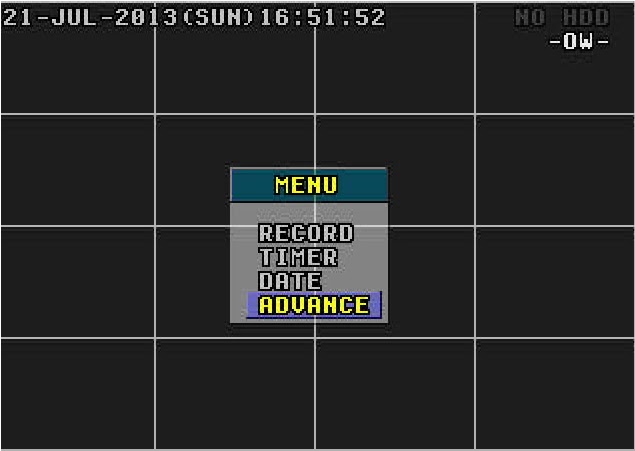
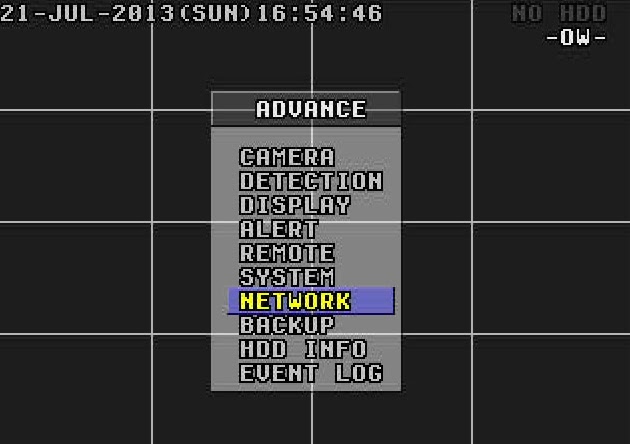
In Network Type, of O.k in Static and put the information picked up from the computer.
IP: You prefer. ( Example: 10.0.0.120)
Gateway: 10.0.0.1
Netmask: 255.255.255.0
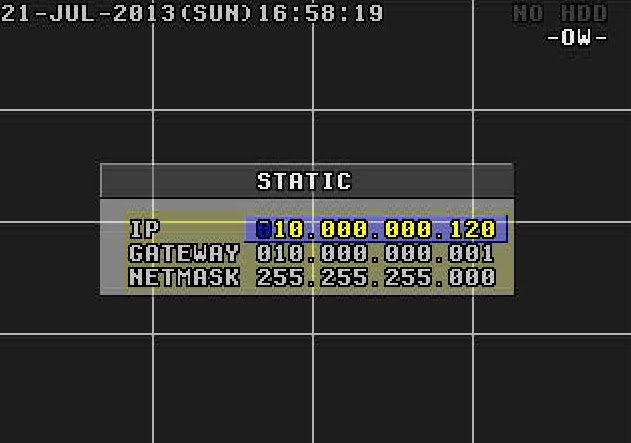
Go back to the Menu Network.
DNS: 10.0.0.1 (the same gateway)
Port: It is the gateway to access your DVR. In this example I'll use port 1227, but you can use the number of your choice.
Obs.: If what you want is internal access, that you can view the cameras from any computer or device that is connected to your internal network, already done you don't need to configure anything else. To view the cameras simply enter your internet browser and enter the following address: http://ip-stand-alone:door (Ex: http://192.168.0.120:1227)
3º Step: Fix external IP
In almost all internet services available, our external IP is not fixed, and yes dynamic, ie every time your router is turned off or disconnected the next made it to connect with your Internet service will be with a different IP. Then this problem, to access the stand-alone we need to know the external IP current network it is connected, since it is not feasible to go to the place where the stand-alone is physically to check the IP address every time the router is turned off we will use a service that updates the IP automatically.
The two most commonly used are the No-IP e o DynDNS, both are paid but the No-IP has the ability to upgrade for free up to three IP addresses per account, for this reason I will use the No-IP for demonstration, but in both the configuration is basically the same.
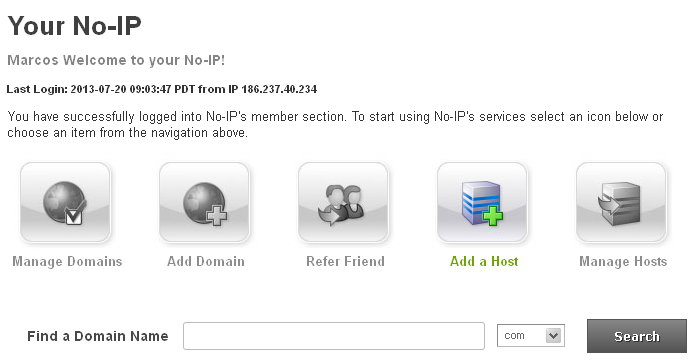
First create an account at No-IP, after that enter the account created and click “Add Host”.
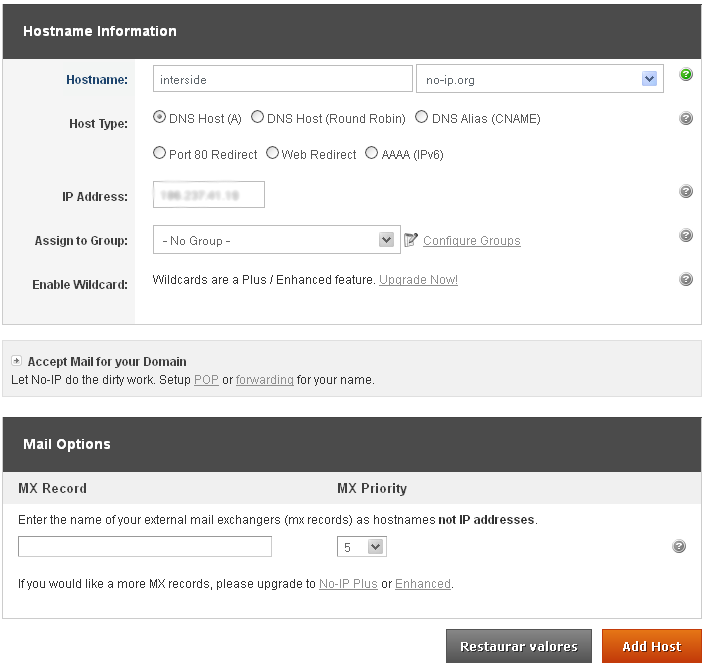
On the next page choose “Hostname” I had used to access your DVR, do not change anything and click “Add Host” at the bottom.
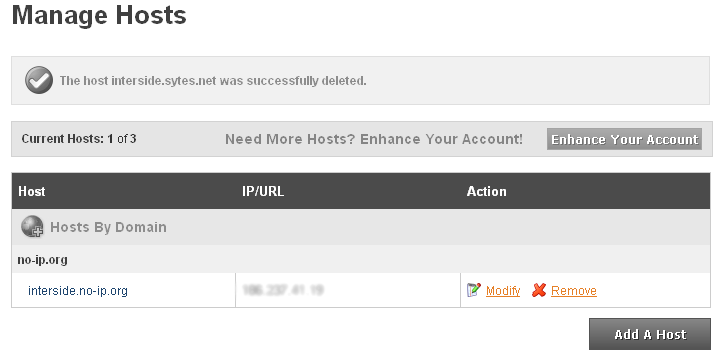
ready your hostname it is created.
4º Step: Configure the router:
Now what we do is to set the IP and the stand-alone door. The router I'm using in this tutorial is the “WRN 240” gives Intelbras, but the configuration is basically the same for any router.
First you go redirection > Virtual server > Add
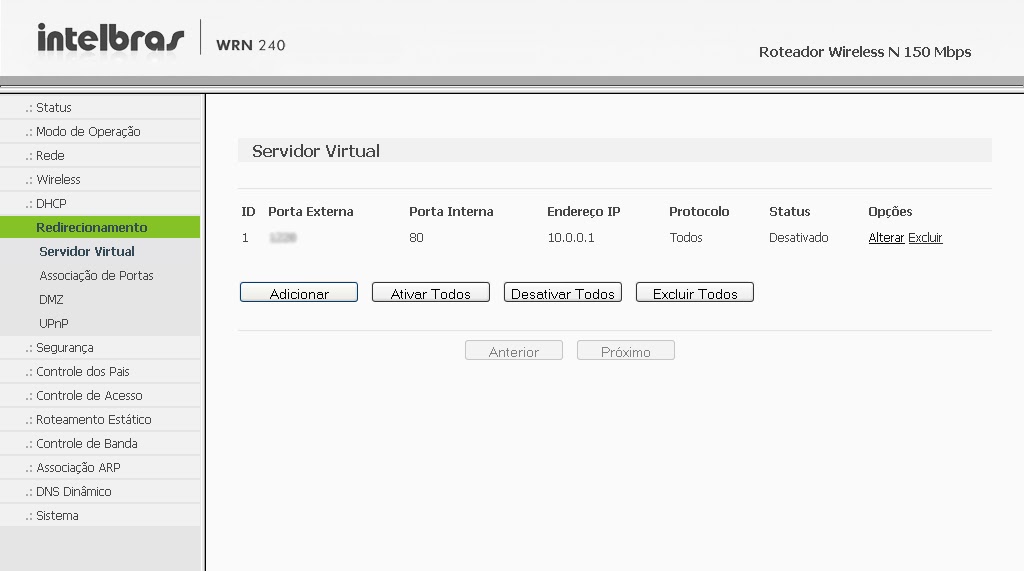
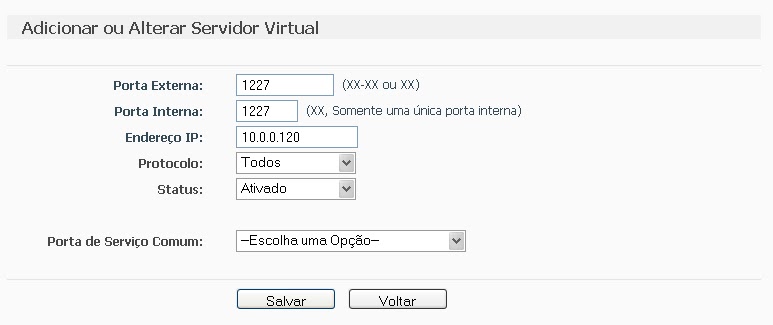
Place the information of the DVR and click save.
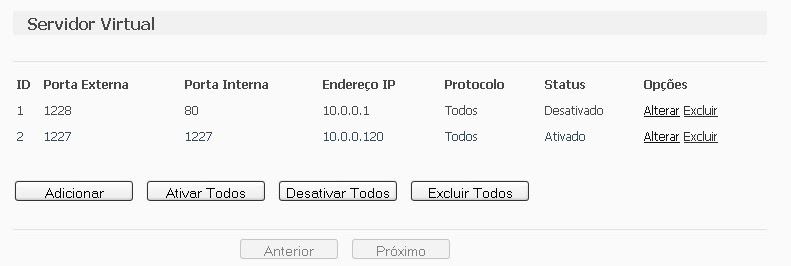
after saving, the port and IP that you set will look like this:
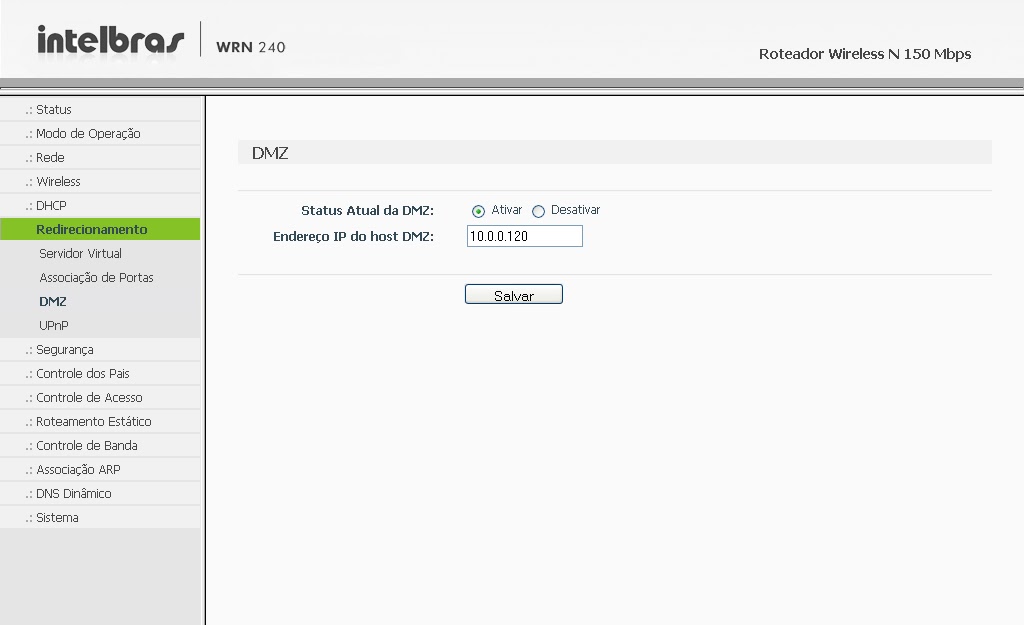
 Some people prefer to make the release of the DMZ ports, as it will be shown abaixo, but by enabling DMZ on your modem or router, you will be compromising the security of your device. Always release the doors manually, as shown above..
Computer security, a DMZ or demilitarized zone (demilitarized zone or DMZ), also known as perimeter network, is a physical or logical subnet that contains and exposes an organization's external border services to a larger, untrusted network, usually internet. Any devices located in this area, this is, between the trusted network (usually the local private network) and the untrusted network (usually the Internet), is in the demilitarized zone.
redirection > DMZ > Select enable, enter the IP of the DVR and save.
The next step is to configure the router to automatically update your network's IP in your NO-IP account.
Go to Dynamic DNS, enter your account information and the hostname/domain you created, click enter. After the “Connection Status” is like “Connected!” click save.
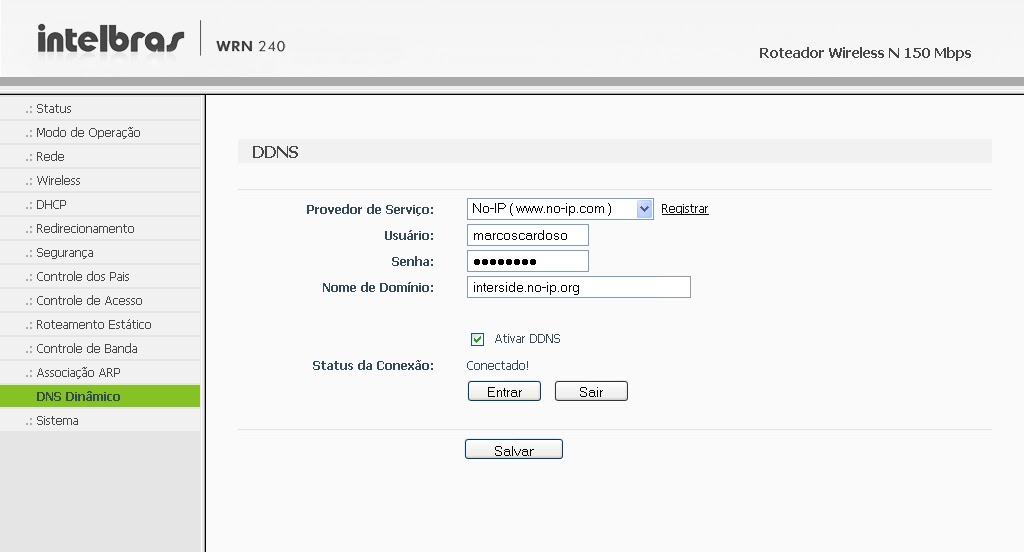
It is, Now you can view your cameras from anywhere in the world.
If you have questions or suggestions leave us comments.






321 Comments
Good evening. I have a dvr 8 channels and access to cameras via cell phone, more to camera 1 I can't access. I already changed the dvr, I changed the camera but nothing. Sometimes she enters but doesn't hold back, It soon falls off and everything else goes back to normal.. Please help me. Thank you Katia
"Anonymous", Yes, you need to make some settings on the DVR.. At first you just have to configure the IP, DNS, Gateway, and the doors.
The configuration for opening the ports is on the router itself..
Fernando, on the IE Tab installer website itself there is a step-by-step guide in the images.
IE Tab Firefox:
https://addons.mozilla.org/pt-br/firefox/addon/ie-tab/
IE Tab chrome:
https://chrome.google.com/webstore/detail/ie-tab/hehijbfgiekmjfkfjpbkbammjbdenadd?hl=pt-BR
Good Morning,, I heard that I don't need to configure the DVR, just the router, this happens? Or do I have to do the part of opening the door on the DVR? Thank you.
DVR- Braforce stand alone
router – TP-LINK
Ok M.A as soon as a client with Linux appears I will look into this situation. Speaking of Firefox….I've tried everything to make it work on Chrome and Firefox on Windows but I couldn't., Do you have any step by step instructions to do this procedure??
Fernando, In Linux you can use the "plugin" IE Tab no firefox.
With this you can access the DVR page in Firefox as if you were using Internet Explorer.
Thanks Adyson, :). But a doubt arose hahaha, actually what is the CD that comes with the DVR for?? Well, I did everything without putting the CD in the computer..
I asked about Linux because I'm starting installations for third parties and I know I'll find everything ahead. :).
Hello FERNANDO,
I believe that Meye normally picks up the iPhone, Ipad, Blackberry, Windows phone.
On Linux, it's kind of difficult to access the cameras through it., because the program that comes with the DVR CD only works on Windows,and browsers only work well in IE, some already support Chrome and Firefox.
If you are using LINUX to access the cameras, I suggest you use Firefox to test, nothing more 100% reliable to work.
Any questions we are here.
Good morning friends, I managed to configure the h.264 dvr for android with the Meye program. Does anyone here know good programs to run on the iPhone?, Ipad, Blackberry, Windows phone, and desktop with linux?
Good Evening Elton,
And regarding DVRs with the CLOUD function, I think that in a while everyone will come with this function activated.
Do a test and ask them to open the doors,I don't think they will make a fuss about it,and give a "Threatened" them that will cancel the service if they do not release,80% Sometimes it works 🙂
Good, Without further ado, if you have any questions, just ask.
Good evening everyone.
Ok, thank you.