
Set up a DVR, ou stand-alone, to be accessed remotely is no big deal, but for those who have no experience below follows a step by step tutorial on how to set up your stand-alone to view your cameras from anywhere that has internet access.
1º Step: Check the information of your network
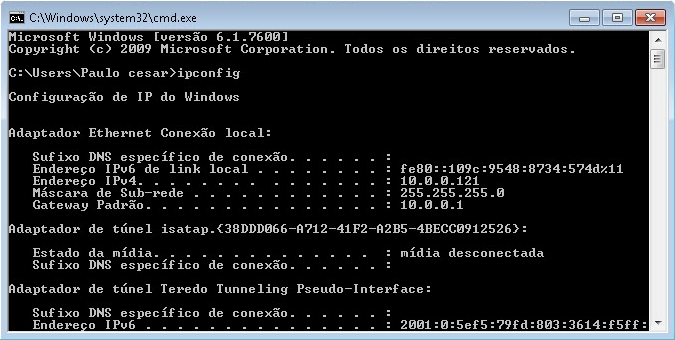
click in Start > run > type it CMD e de enter.
No Command prompt which opened type ipconfig e de enter.
Record the following information for later use:
- Subnet Mask
- default Gateway
2º Step: Configurar o stand-alone (internal and external access)
As there are several models the way to configure each DVR may vary, but the premise is the same.
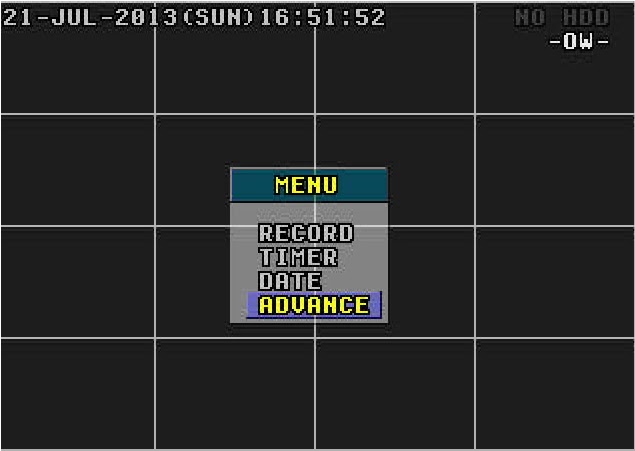
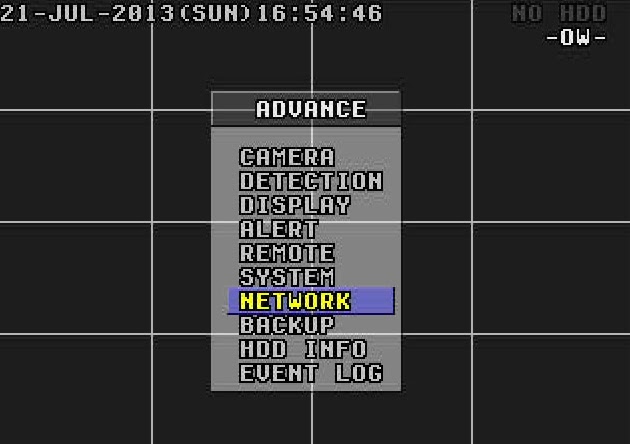
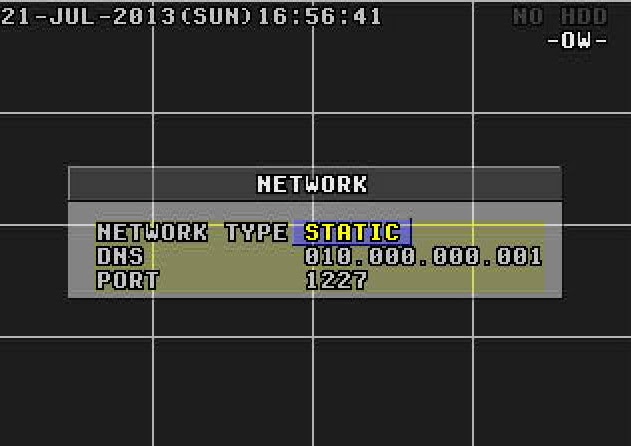
Menu > Advance > Network
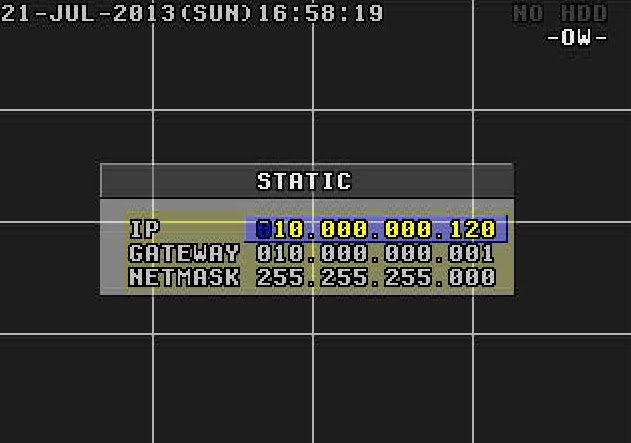
In Network Type, of O.k in Static and put the information picked up from the computer.
IP: You prefer. ( Example: 10.0.0.120)
Gateway: 10.0.0.1
Netmask: 255.255.255.0
Go back to the Menu Network.
DNS: 10.0.0.1 (the same gateway)
Port: It is the gateway to access your DVR. In this example I'll use port 1227, but you can use the number of your choice.
Obs.: If what you want is internal access, that you can view the cameras from any computer or device that is connected to your internal network, already done you don't need to configure anything else. To view the cameras simply enter your internet browser and enter the following address: http://ip-stand-alone:door (Ex: http://192.168.0.120:1227)
3º Step: Fix external IP
In almost all internet services available, our external IP is not fixed, and yes dynamic, ie every time your router is turned off or disconnected the next made it to connect with your Internet service will be with a different IP. Then this problem, to access the stand-alone we need to know the external IP current network it is connected, since it is not feasible to go to the place where the stand-alone is physically to check the IP address every time the router is turned off we will use a service that updates the IP automatically.
The two most commonly used are the No-IP e o DynDNS, both are paid but the No-IP has the ability to upgrade for free up to three IP addresses per account, for this reason I will use the No-IP for demonstration, but in both the configuration is basically the same.
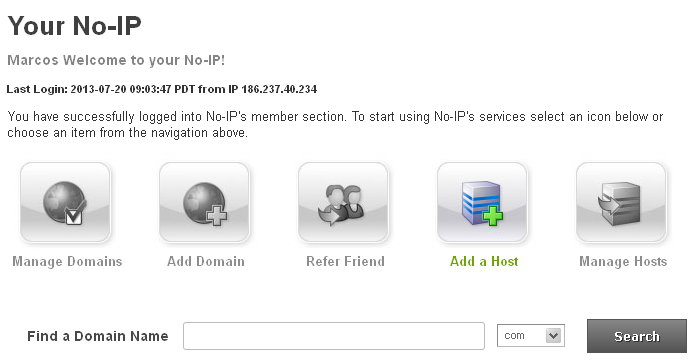
First create an account at No-IP, after that enter the account created and click “Add Host”.
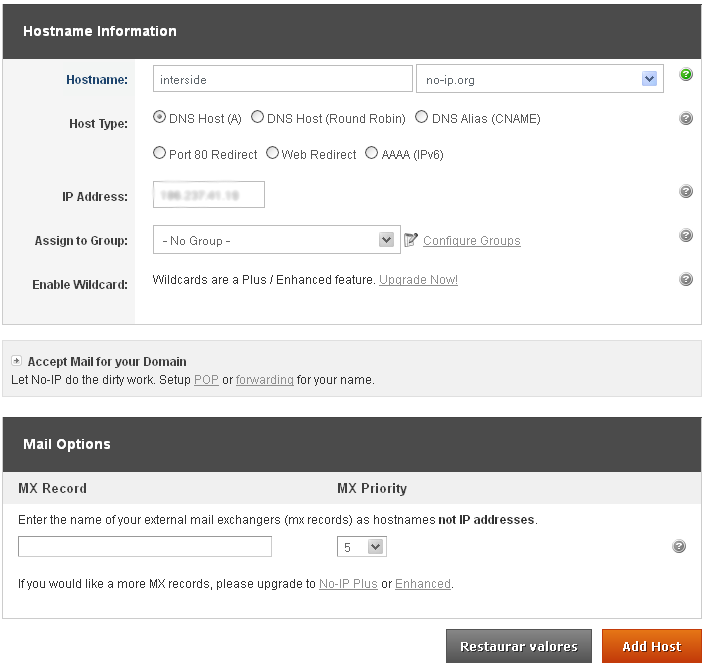
On the next page choose “Hostname” I had used to access your DVR, do not change anything and click “Add Host” at the bottom.
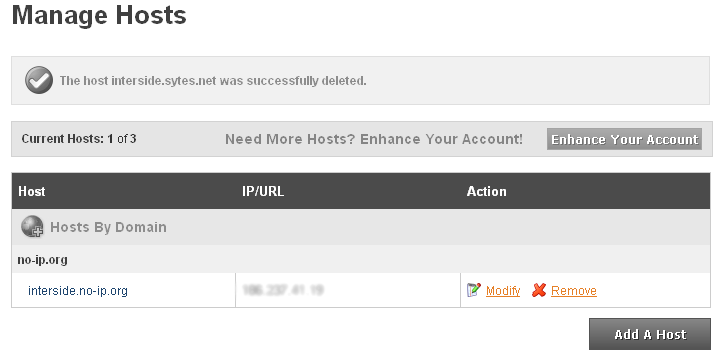
ready your hostname it is created.
4º Step: Configure the router:
Now what we do is to set the IP and the stand-alone door. The router I'm using in this tutorial is the “WRN 240” gives Intelbras, but the configuration is basically the same for any router.
First you go redirection > Virtual server > Add
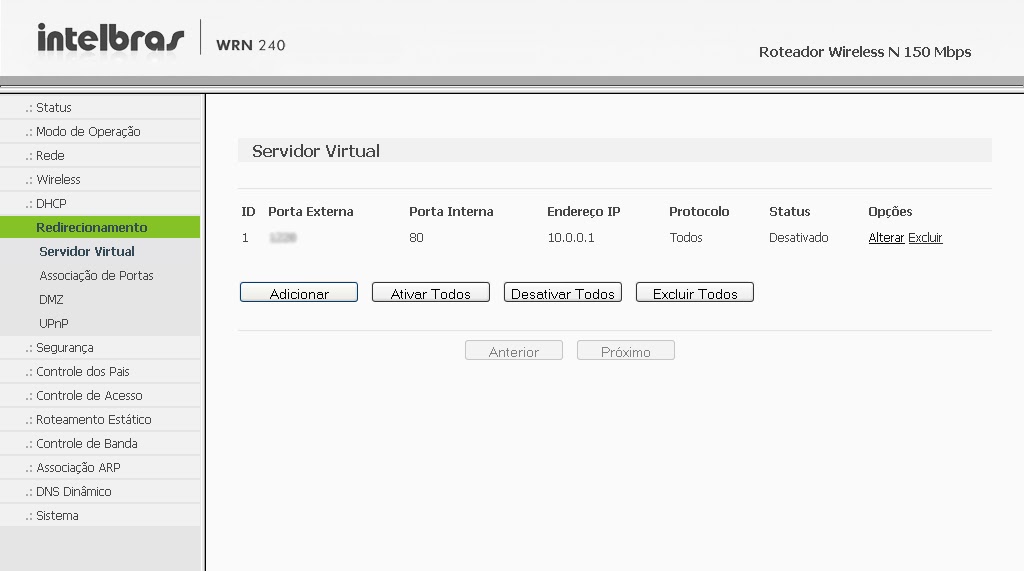
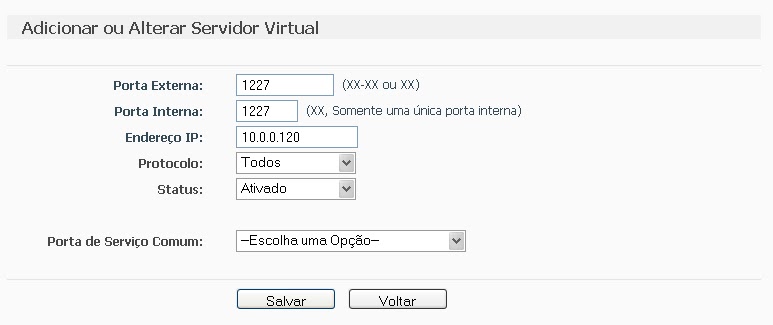
Place the information of the DVR and click save.
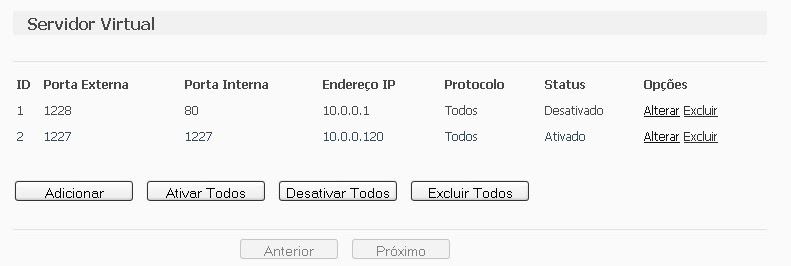
after saving, the port and IP that you set will look like this:
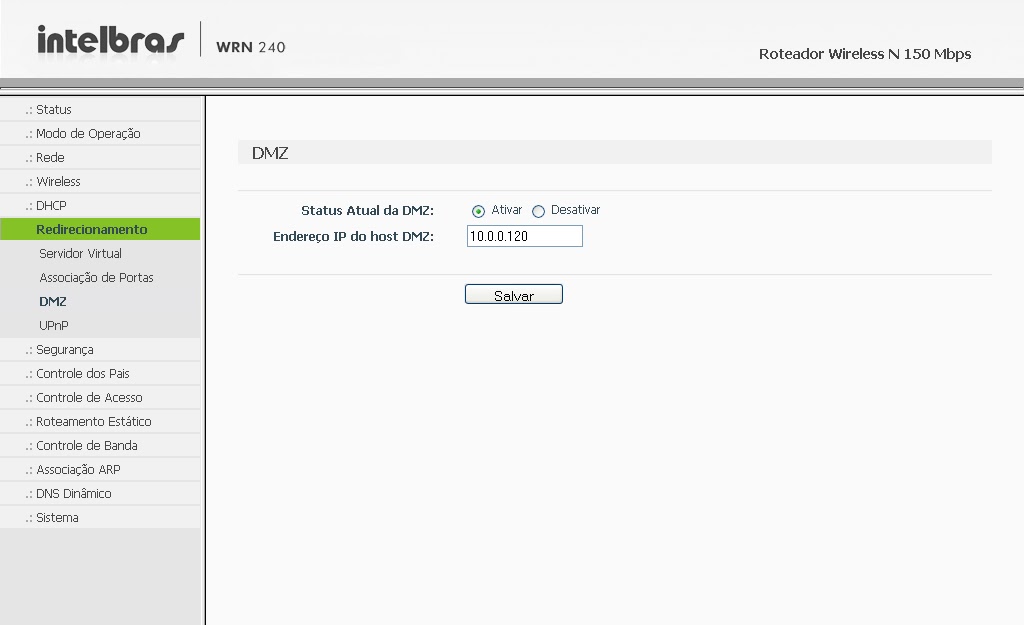
 Some people prefer to make the release of the DMZ ports, as it will be shown abaixo, but by enabling DMZ on your modem or router, you will be compromising the security of your device. Always release the doors manually, as shown above..
Computer security, a DMZ or demilitarized zone (demilitarized zone or DMZ), also known as perimeter network, is a physical or logical subnet that contains and exposes an organization's external border services to a larger, untrusted network, usually internet. Any devices located in this area, this is, between the trusted network (usually the local private network) and the untrusted network (usually the Internet), is in the demilitarized zone.
redirection > DMZ > Select enable, enter the IP of the DVR and save.
The next step is to configure the router to automatically update your network's IP in your NO-IP account.
Go to Dynamic DNS, enter your account information and the hostname/domain you created, click enter. After the “Connection Status” is like “Connected!” click save.
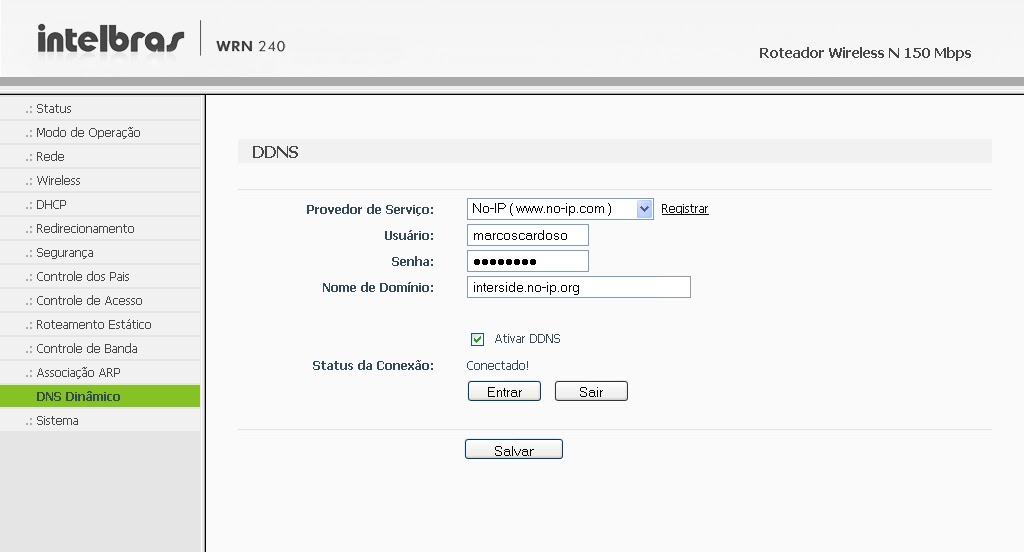
It is, Now you can view your cameras from anywhere in the world.
If you have questions or suggestions leave us comments.






321 Comments
Will, Try making these settings in IE on your notebook: http://windows.microsoft.com/pt-br/windows/help/genuine/ie-activex
Then test internal access.
Good morning guys, I have the following problems.
I'm configuring the NET Humax modem, and liberei as Portas, I already configured DMZ, I already set the DNS correctly, but the access does not work. I went to test the ports that I released on the modem with all the rules correct, then the mystery in the check port says that the ports that I released are still closed. I already reset the modem and did it again and nothing. I called NET and no one could answer my problem. help please.
Good evening M.a Cardoso ,
sorry for the delay in responding . . .
Well, you said that for external access you have to make some additional settings ,what would they be ? From what I read about external access to cameras and what I understood is that the ports configured on the DVR and modem have to be released so that external access is possible and that's exactly what I did, I even checked through a website if they were open and the answer was yes. . . .
Now to answer your question, the browser I use on both computers in the store is Internet Explorer , at my house I use the notebook that has IE 7 but unfortunately I can't access the cameras through it , In fact, not even at my house or when I take it to the store . . . I really don't understand why ,I've read everything posted on YouTube and here about how to configure cameras for external access, but unfortunately I can't do it, I would be very grateful if you could help me. , I suspect that the problem could be my laptop because when I have it in the store and try to access the cameras through it via the Internet Explorer browser, a warning appears that I mentioned in my first comment and when I'm at home with it and try to access the cameras the warning is : Unable to display the page .
Well that's it , I await your return !!
Thank you and have a great week . . .
Grateful
will
WILL, Even if internal access works, it is not guaranteed that external access will also work. For external access, you have to make some more settings than internal access..
At first, the best thing is to set up a DDNS account, because if you write down the IP and when you get home and there is a power outage where the router is, that IP will have already changed. It is even difficult for you to know whether the access is working or not..
To access cameras, Which browser do you use on both PCs?" from the store, the browser on your notebook and the browser you use at home?
Most DVRs only work with Internet Explorer, and some only work with IE version 7 down.
M A, yes he has. The cable is going from the router to the DVR
FERNANDO, before the DVR there is a router?
HELLO GOODNIGHT ,
MY NAME IS WILL AND I'M HAVING PROBLEMS ACCESSING THE SECURITY CAMERAS EXTERNALLY . . .
I HAVE THE DVR FVN H.246 AND A MODEM/ROUTER (IT HAS BOTH FUNCTIONS) ARRIS BRAND AND AN INTERNET OF THE NET, I CAN ONLY GET INTERNAL ACCESS ON THE TWO COMPUTERS I HAVE IN THE STORE , MORE IN MY NOT BOOK ON THE INTERNAL WIFI NETWORK I CANNOT ( EVERY TIME I TRY TO ACCESS THROUGH IE A WARNING LIKE THIS APPEARS : YOUR SYSTEM DOES NOT SUPPORT ACTIVEX PLUGS PLEASE CLICK HERE TO DOWNLOAD THEM ) THAT'S MORE OR LESS BECAUSE IT'S IN ENGLISH AND WHAT I UNDERSTAND WAS THIS LOL , BUT WHEN I CLICK, NOTHING HAPPENS, IT'S AS IF THERE WASN'T OR THERE WAS NO COMMAND TO EXECUTE THIS , GOOD I THINK IT MUST BE CONFIGURATION PROBLEMS IN MY NOT BOOK BUT CONTINUING MY QUESTION IS BECAUSE I CAN ACCESS THE INTERNAL NETWORK BUT NOT THE EXTERNAL ? IT'S TIME THAT BY LOOKING AT YOUR SETTINGS INFORMATION AND CHECKING MY MODEM AND DVR EVERYTHING IS CORRECT BECAUSE IF I DIDN'T HAVE IT I WOULDN'T BE ABLE TO ACCESS MY CAMERAS INTERNALLY RIGHT ? OR AM I WRONG ? DOUBT 2 I CONFIRM THROUGH A WEBSITE IF MY MODEM PORTS ARE OPEN AND I HAVE CONFIRMATION THAT YES SO I GOT MY EXTERNAL IP NUMBER ( ACCESSING MY IP ON GOOGLE ) WHERE ARE THE CAMERAS AND DVR INSTALLED? ( IN MY STORE ) AND I TRIED TO ACCESS EXTERNALLY (FROM MY HOUSE) WITH THIS IP PLUS THE EXAMPLE PORT NUMBERS :http://189.29.141.183:8090 BUT I CANNOT ACCESS THE CAMERAS UNFORTUNATELY , I KNOW THE RIGHT THING IS TO SET UP A NO-IP SO THAT IT UPDATE MY IP EVERY DAY BUT AS I'M THE ONE WHO OPENS THE STORE EVERY DAY AND IT'S ONLY AT THE END OF THE DAY THAT THE STORE CLOSES SO TO MAKE IT SIMPLE FOR ME I GO AND WRITE DOWN THE VALID IP OF MY EXTERNAL NETWORK , GOOD I HOPE YOU UNDERSTAND EVERYTHING I SAID AND THIS CAN HELP ME TO SOLVE MY PROBLEM , THANK YOU VERY MUCH IN NOW !! IF YOU DON'T UNDERSTAND AND IF YOU CAN CALL ME, MY PHONE IS (TIM) 982816065 OR BY SKIPE WILL.3_@HOTMAIL.COM THIS IS ALSO MY EMAIL ONCE AGAIN THANK YOU VERY MUCH !!!
OBS: FIXED IP 192.168.0.6
DOORS : 8090 E 8200
EXTERNAL IP : TODAY'S WAS http://189.29.141.183 ( EVERY DAY IS A DIFFERENT NUMBER )
Good afternoon M A,
I have a problem with remote configuration with a local internet server. It's the following: I contacted the server and asked for it to be passed 1 IP for the dvr and port release. The attendant informed me that the IP I would use was a public IP there and that the ports were already open on that IP.. When starting to configure the DVR I checked the option to obtain an IP on the network….he got the IP and I proceeded with the rest of the configuration. However, the device's connection status did not change to connected, that is, the procedure performed did not work. After that I restarted the DVR and entered the public IP given by the technician, however, as soon as I enter this IP, the gateway automatically changes to 0.0.0.0. I called the server and they seemed a little lost as to what should be done.. What do you think might be happening??
I still haven't got it. I tried to add you on Skype. but until now it hasn't been online! What can I do to open these doors?. how to proceed?
Mak Films, Have you managed to open the doors??