
Set up a DVR, ou stand-alone, to be accessed remotely is no big deal, but for those who have no experience below follows a step by step tutorial on how to set up your stand-alone to view your cameras from anywhere that has internet access.
1º Step: Check the information of your network
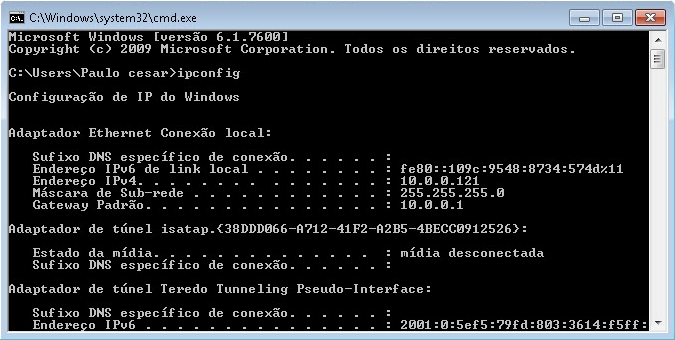
click in Start > run > type it CMD e de enter.
No Command prompt which opened type ipconfig e de enter.
Record the following information for later use:
- Subnet Mask
- default Gateway
2º Step: Configurar o stand-alone (internal and external access)
As there are several models the way to configure each DVR may vary, but the premise is the same.
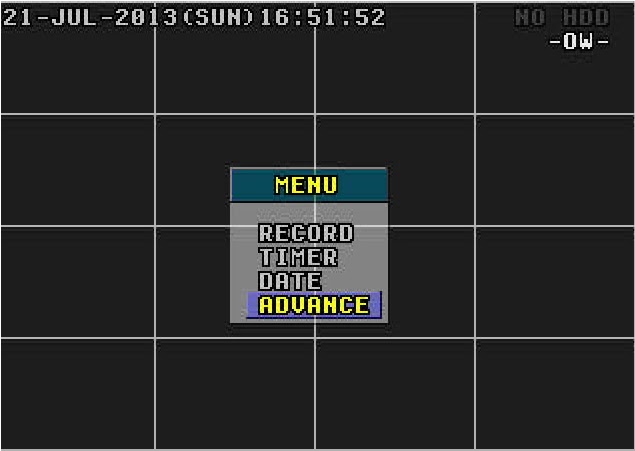
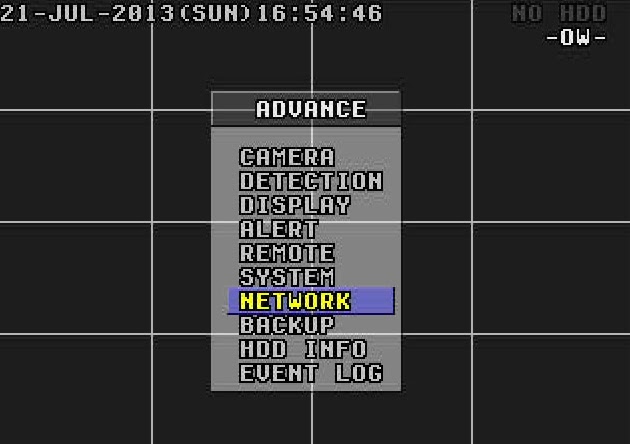
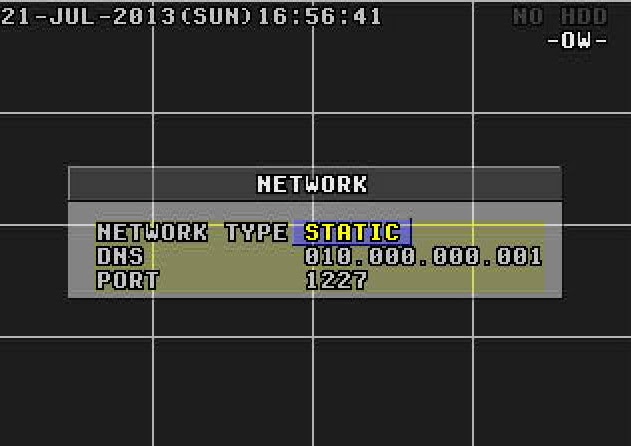
Menu > Advance > Network
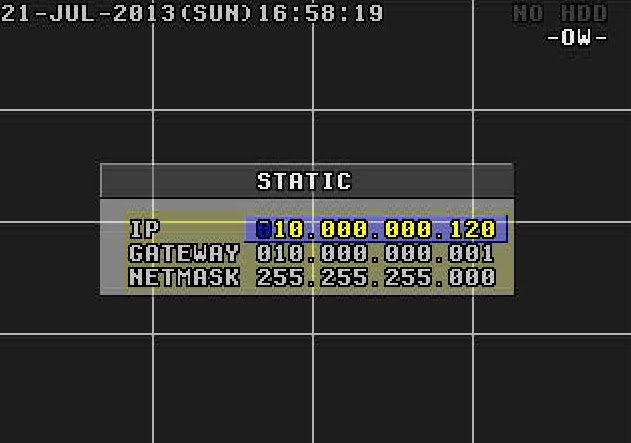
In Network Type, of O.k in Static and put the information picked up from the computer.
IP: You prefer. ( Example: 10.0.0.120)
Gateway: 10.0.0.1
Netmask: 255.255.255.0
Go back to the Menu Network.
DNS: 10.0.0.1 (the same gateway)
Port: It is the gateway to access your DVR. In this example I'll use port 1227, but you can use the number of your choice.
Obs.: If what you want is internal access, that you can view the cameras from any computer or device that is connected to your internal network, already done you don't need to configure anything else. To view the cameras simply enter your internet browser and enter the following address: http://ip-stand-alone:door (Ex: http://192.168.0.120:1227)
3º Step: Fix external IP
In almost all internet services available, our external IP is not fixed, and yes dynamic, ie every time your router is turned off or disconnected the next made it to connect with your Internet service will be with a different IP. Then this problem, to access the stand-alone we need to know the external IP current network it is connected, since it is not feasible to go to the place where the stand-alone is physically to check the IP address every time the router is turned off we will use a service that updates the IP automatically.
The two most commonly used are the No-IP e o DynDNS, both are paid but the No-IP has the ability to upgrade for free up to three IP addresses per account, for this reason I will use the No-IP for demonstration, but in both the configuration is basically the same.
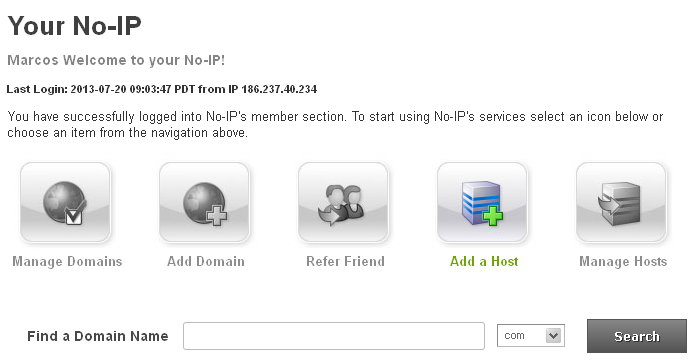
First create an account at No-IP, after that enter the account created and click “Add Host”.
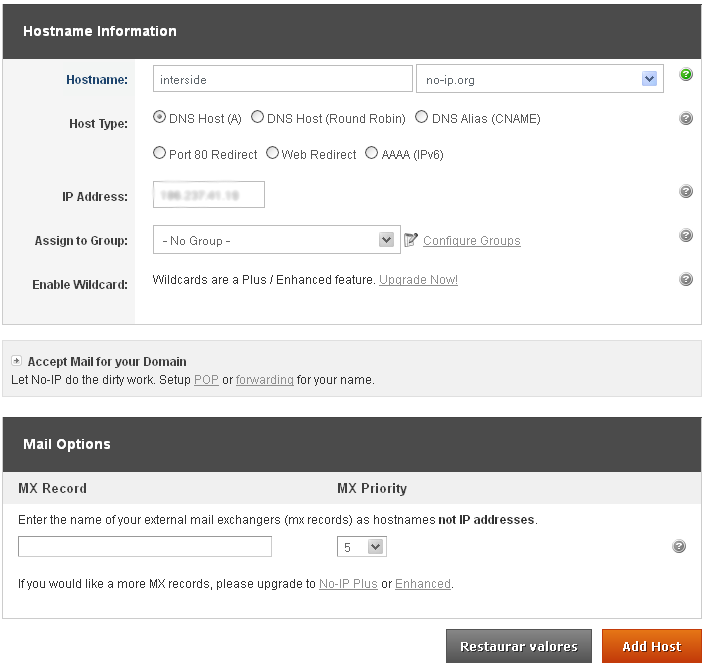
On the next page choose “Hostname” I had used to access your DVR, do not change anything and click “Add Host” at the bottom.
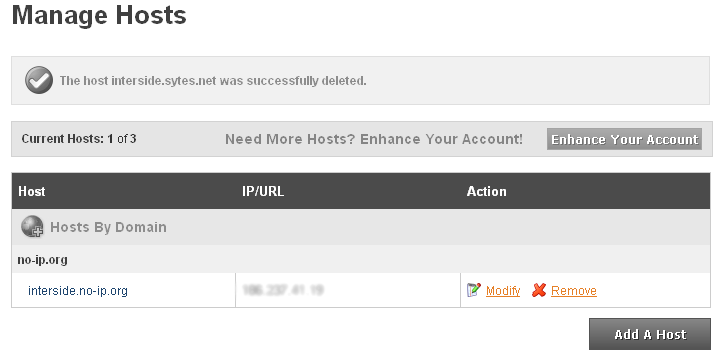
ready your hostname it is created.
4º Step: Configure the router:
Now what we do is to set the IP and the stand-alone door. The router I'm using in this tutorial is the “WRN 240” gives Intelbras, but the configuration is basically the same for any router.
First you go redirection > Virtual server > Add
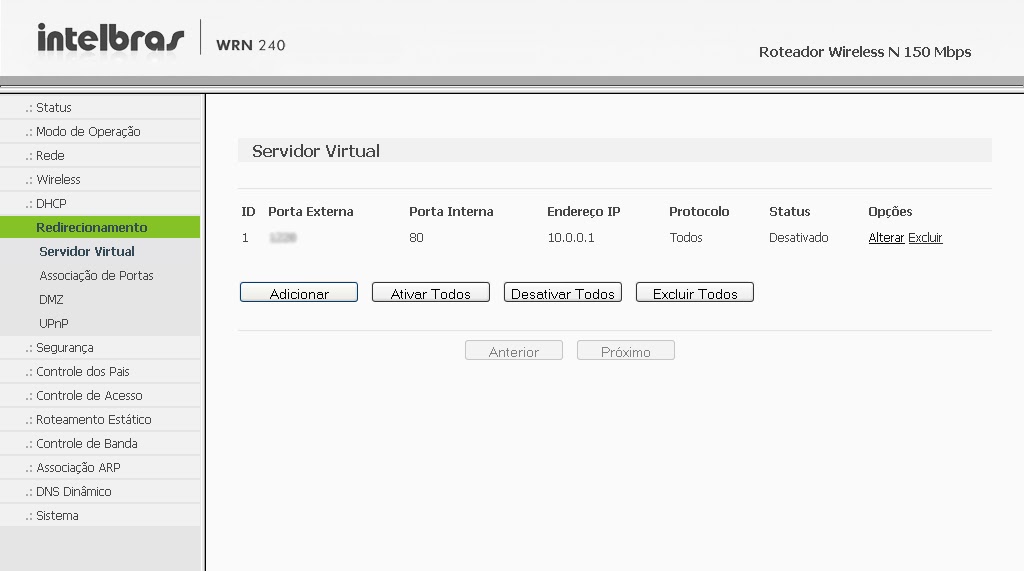
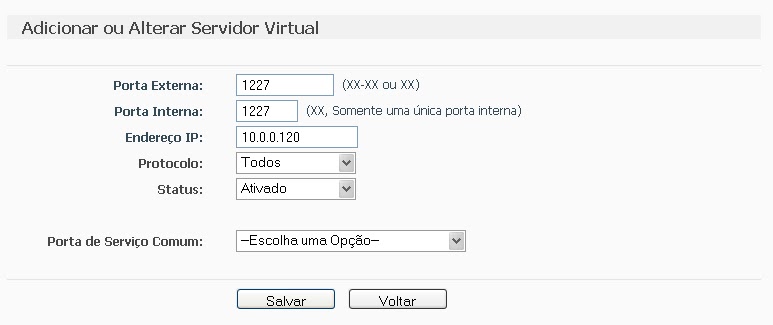
Place the information of the DVR and click save.
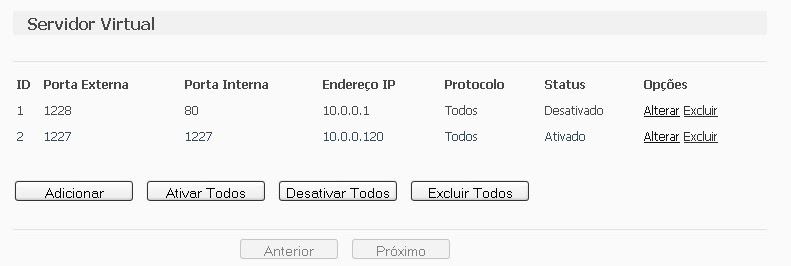
after saving, the port and IP that you set will look like this:
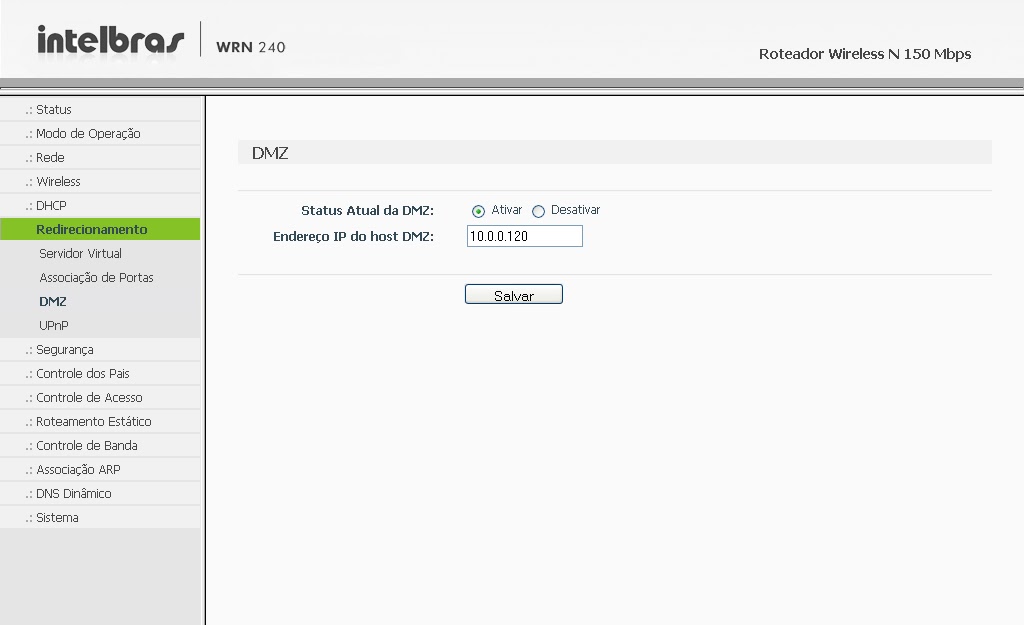
 Some people prefer to make the release of the DMZ ports, as it will be shown abaixo, but by enabling DMZ on your modem or router, you will be compromising the security of your device. Always release the doors manually, as shown above..
Computer security, a DMZ or demilitarized zone (demilitarized zone or DMZ), also known as perimeter network, is a physical or logical subnet that contains and exposes an organization's external border services to a larger, untrusted network, usually internet. Any devices located in this area, this is, between the trusted network (usually the local private network) and the untrusted network (usually the Internet), is in the demilitarized zone.
redirection > DMZ > Select enable, enter the IP of the DVR and save.
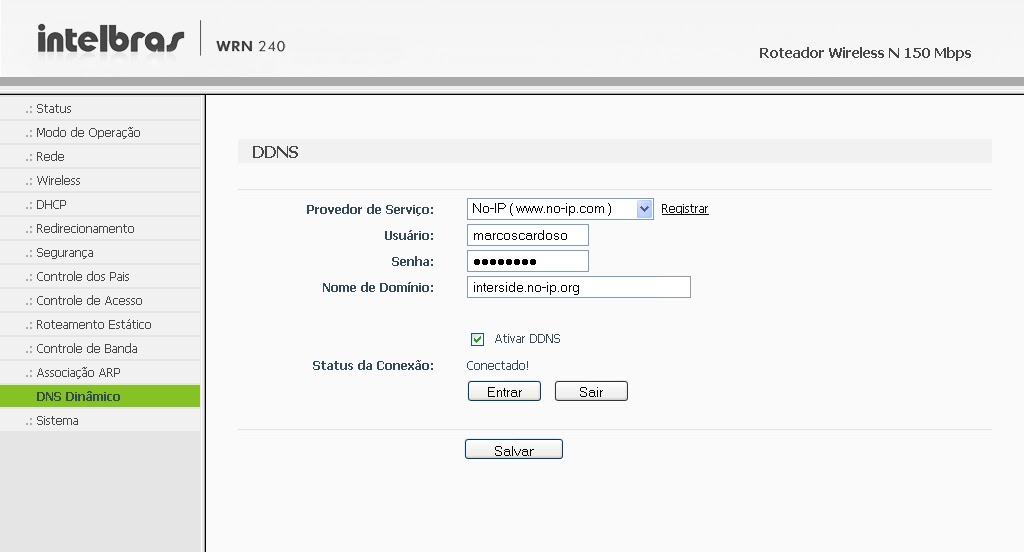
The next step is to configure the router to automatically update your network's IP in your NO-IP account.
Go to Dynamic DNS, enter your account information and the hostname/domain you created, click enter. After the “Connection Status” is like “Connected!” click save.
It is, Now you can view your cameras from anywhere in the world.
If you have questions or suggestions leave us comments.






321 Comments
Hello Cardoso, the address I try to access is http://preprecegueiro.no-ip.org:8888
Mauro, what is the host name that you are using to access your DVR over the internet?
Good Morning,
Very good step-by-step explanation of the configuration, thank you.
But I was unsuccessful, I can even view the cameras via the WiFi network on my PC, but I can't view them via the internet, I made all the settings as informed and changed the port 80 for 8888.
Can anyone help me my DVR is an H.264
my email is mprecegueiro@hotmail.com
Thank you
Responding to Sgrott:
The problem is in the DDNS configuration. Redo the DDNS configuration on the router and on the company's website. Dyn.
Responding:
"I would like to know if it is possible to access via the local network: I have a business that is 90 meter from my house. without going online"
Response: There are two options for this, One of them is to run a cable from your business to your home, but this option is not very viable. Another option is to make a wireless connection, using powerful equipment and antennas WiFi.
But the best thing is to do it the normal way. I believe that your business has an internet point and your home also has an internet point.. Configure remote access and put a password on everything, This way, no one will access it without your authorization.
Responding:
"I have the same problem, I already have the port configured, ddns, access on my internal network, both by IP and both by DDNS. on my dvr there are two port fields, So I opened two doors and they were tested and they are ok, I also see that the hhtp port is already configured as 80, and I don't find a solution "
Response: At the door http of your DVR has to be different from "80", because many applications use this port and this causes conflict.
Oi,Now with this explanation I was able to access my DVR from afar,i.e. outside the network,But it only works for one day,criei conta na dyn, dmz no modem (because the router has DHCP disabled) com ip do dvr,dyn dns account configured on the modem as you said,but I still update the IP on the dyn, one day just the next it doesn't connect, I look there and Dyn's IP is different from the IP I have. What can be?? Thank you
I would like to know if it is possible to access via the local network: I have a business that is 90 meter from my house. without going online
I have the same problem, I already have the port configured, ddns, access on my internal network, both by IP and both by DDNS. on my dvr there are two port fields, So I opened two doors and they were tested and they are ok, I also see that the hhtp port is already configured as 80, and I don't find a solution
Zhaga Promotional, leave your SKYPE address in the comments.