
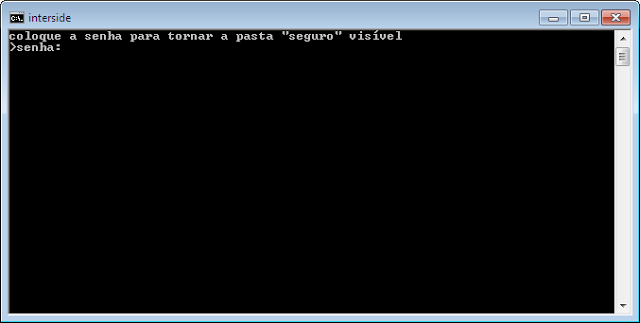

With this trick you will be able to hide folders using the CMD. The first thing to do is open the Notepad do Windows, paste the code on it , which is shown below, and save with the extension BAT. For example, you click save as and places the file name as “invisível.bat”.
Copy or code:
cls
@ECHO OFF

title interside

if EXIST "Control Panel.{21EC2020-3AEA-1069-A2DD-08002B30309D}" goto UNLOCK

if NOT EXIST seguro goto MDLOCKER

:CONFIRM

echo You sure you want to make sure folder invis¡vel(S/N)

set/p "for =>"

if %cho%==S goto LOCK

if %cho%==s goto LOCK

if %cho%==n goto END

if %cho%==N goto END

echo Escolha Invµlida.

goto CONFIRM

:LOCK

ren seguro "Control Panel.{21EC2020-3AEA-1069-A2DD-08002B30309D}"

attrib +h +s +r +i "Control Panel.{21EC2020-3AEA-1069-A2DD-08002B30309D}"

echo a pasta seguro está invis¡vel

goto End

:UNLOCK

echo coloque a senha para tornar a pasta seguro vis¡vel

set/p "pass=>password: "

if NOT %pass%==123456 goto FAIL

attrib -h -s "Control Panel.{21EC2020-3AEA-1069-A2DD-08002B30309D}"

ren "Control Panel.{21EC2020-3AEA-1069-A2DD-08002B30309D}" seguro

echo a pasta seguro está vis¡vel

goto End

:FAIL

echo senha invµlida

goto UNLOCK

:MDLOCKER

md Seguro

echo bloqueio desativado

goto End

:End;
To put the password of your choice, just change the default password “123456”, no code, and put the password you want.
Ok, Now when you run the BAT file the first time it will create a folder named “insurance”. So, you will place the files, you want to hide, the folder “insurance”. When you want to make the folder “insurance” Invisible run the BAT file, confirm with “S”, and ready his briefcase disappeared.
Now, when you want to view the folder again, run the BAT file and enter the password that was previously set.
Leave your questions, criticism or suggestions in the comments. Or contact through chat.






One Comment
Very good. Descomplica what all complicate.